
这篇文章主要介绍了在 asp.net core 的中间件中返回具体的页面的实现方法,本文给大家介绍的非常详细,对大家的学习或工作具有一定的参考借鉴价值,需要的朋友可以参考下
前言
在 asp.net core 中,存在着中间件这一概念,在中间件中,我们可以比过滤器更早的介入到 http 请求管道,从而实现对每一次的 http 请求、响应做切面处理,从而实现一些特殊的功能
在使用中间件时,我们经常实现的是鉴权、请求日志记录、全局异常处理等等这种非业务性的需求,而如果你有在 asp.net core 中使用过 swashbuckle(*ger)、health check、mini profiler 等等这样的组件的话,你会发现,这些第三方的组件往往都提供了页面,允许我们通过可视化的方式完成某些操作或浏览某些数据
因为自己也需要实现类似的功能,虽然使用到的知识点很少、也很简单,但是在网上搜了搜也没有专门介绍这块的文档或文章,所以本篇文章就来说明如何在中间件中返回页面,如果你有类似的需求,希望可以对你有所帮助
Step by Step
最终实现的功能其实很简单,当用户跳转到某个指定的地址后,自定义的中间件通过匹配到该路径,从而返回指定的页面,所以这里主要会涉及到中间件是如何创建,以及如何处理页面中的静态文件引用
因为这块并不会包含很多的代码,所以这里主要是通过分析 Swashbuckle.AspNetCore 的代码,了解它是如何实现的这一功能,从而给我们的功能实现提供一个思路
在 asp.net core 中使用 Swashbuckle.AspNetCore 时,我们通常需要在 Startup 类中针对组件做如下的配置,根据当前程序的信息生成 json 文件 =》 公开生成的 json 文件地址 =》 根据 json 文件生成可视化的交互页面
public class Startup
{
// This method gets called by the runtime. Use this method to add services to the container.
public void ConfigureServices(IServiceCollection services)
{
// 生成 *ger 配置的 json 文件
services.AddSwaggerGen(s =>
{
s.SwaggerDoc(“v1”, new OpenApiInfo
{
Contact = new OpenApiContact
{
Name = “Danvic Wang”,
Url = new Uri(“https://yuiter.com”),
},
Description = “Template.API – ASP.NET Core 后端接口模板”,
Title = “Template.API”,
Version = “v1”
});
// 参数使用驼峰的命名方式
s.DescribeAllParametersInCamelCase();
});
}
// This method gets called by the runtime. Use this method to configure the HTTP request pipeline.
public void Configure(IApplicationBuilder app, IWebHostEnvironment env)
{
// 公开 *ger 生成的 json 文件节点
app.UseSwagger();
// 启用 *ger 可视化交互页面
app.UseSwaggerUI(s =>
{
s.SwaggerEndpoint($”/*ger/v1/*ger.json”,
$”Swagger doc v1″);
});
}
}
可以看到最终呈现给用户的页面,其实是在 Configure 方法中通过调用 UseSwaggerUI 方法来完成的,这个方法是在 Swashbuckle.AspNetCore.SwaggerUI 这个程序集中,所以这里直接从 github 上找到对应的文件夹,clone 下源代码,来看下是如何实现在中间件中返回特定的页面
在 clone 下的代码中,排除掉一些 c#、node.js 使用到的项目性文件,可以看到整个项目中的文件按照功能可以分为三大块,其中最核心的则是在 SwaggerUIMiddleware 类中,因此,这里主要聚焦在这个中间件类的实现
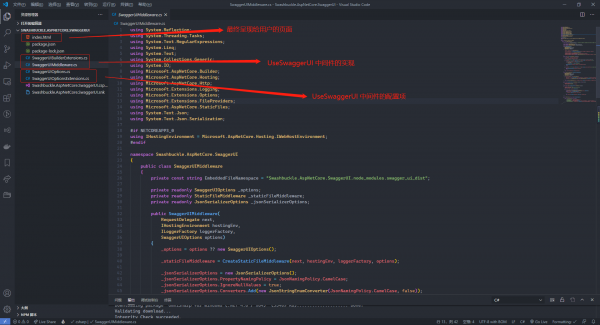
在一个 asp.net core 中间件中,核心的处理逻辑是在 Invoke/InvokeAsync 方法中,结合我们使用 *ger 时的场景,可以看到,在将组件中所包含的页面呈现给用户时,主要存在如下两个处理逻辑
1、当匹配到用户访问的是 /*ger 时,返回 301 的 http 状态码,浏览器重定向到 /*ger/index.html,从而再次触发该中间件的执行
2、当匹配到请求的地址为 /*ger/index.html 时,将嵌入到程序集中的文件通过 stream 流的形式获取到,转换成字符串,再指定请求的响应的类型为 text/html,从而实现将页面返回给用户
public async Task Invoke(HttpContext httpContext)
{
var httpMethod = httpContext.Request.Method;
var path = httpContext.Request.Path.Value;
// If the RoutePrefix is requested (with or without trailing slash), redirect to index URL
if (httpMethod == “GET” && Regex.IsMatch(path, $”^/?{Regex.Escape(_options.RoutePrefix)}/?$”))
{
// Use relative redirect to support proxy environments
var relativeRedirectPath = path.EndsWith(“/”)
? “index.html”
: $”{path.Split(/).Last()}/index.html”;
RespondWithRedirect(httpContext.Response, relativeRedirectPath);
return;
}
if (httpMethod == “GET” && Regex.IsMatch(path, $”^/{Regex.Escape(_options.RoutePrefix)}/?index.html$”))
{
await RespondWithIndexHtml(httpContext.Response);
return;
}
await _staticFileMiddleware.Invoke(httpContext);
}
这里需要注意,因为类似于这种功能,我们可能会打包成独立的 nuget 包,然后通过 nuget 进行引用,所以为了能够正确获取到页面及其使用到的静态资源文件,我们需要将这些静态文件的属性修改成嵌入的资源,从而在打包时可以包含在程序集中
对于网页来说,在引用这些静态资源文件时存在一种相对的路径关系,因此,这里在中间件的构造函数中,我们需要将页面需要使用到的静态文件,通过构建 StaticFileMiddleware 中间件,将文件映射与网页相同的 /*ger 路径下面,从而确保页面所需的资源可以正确加载
public class SwaggerUIMiddleware
{
private const string EmbeddedFileNamespace = “Swashbuckle.AspNetCore.SwaggerUI.node_modules.*ger_ui_dist”;
private readonly SwaggerUIOptions _options;
private readonly StaticFileMiddleware _staticFileMiddleware;
public SwaggerUIMiddleware(
RequestDelegate next,
IHostingEnvironment hostingEnv,
ILoggerFactory loggerFactory,
SwaggerUIOptions options)
{
_options = options ?? new SwaggerUIOptions();
_staticFileMiddleware = CreateStaticFileMiddleware(next, hostingEnv, loggerFactory, options);
}
private StaticFileMiddleware CreateStaticFileMiddleware(
RequestDelegate next,
IHostingEnvironment hostingEnv,
ILoggerFactory loggerFactory,
SwaggerUIOptions options)
{
var staticFileOptions = new StaticFileOptions
{
RequestPath = string.IsNullOrEmpty(options.RoutePrefix) ? string.Empty : $”/{options.RoutePrefix}”,
FileProvider = new EmbeddedFileProvider(typeof(SwaggerUIMiddleware).GetTypeInfo().Assembly, EmbeddedFileNamespace),
};
return new StaticFileMiddleware(next, hostingEnv, Options.Create(staticFileOptions), loggerFactory);
}
}
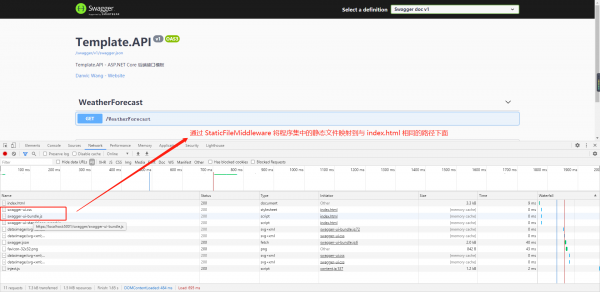
当完成了页面的呈现后,因为一般我们会创建一个单独的类库来实现这些功能,在页面中,可能会包含前后端的数据交互,由于我们在宿主的 API 项目中已经完成了对于路由规则的设定,所以这里只需要在类库中通过 nuget 引用 Microsoft.AspNetCore.Mvc.Core ,然后与 Web API 一样的定义 controller,确保这个中间件在宿主程序的调用位于路由匹配规则之后即可
public void Configure(IApplicationBuilder app, IWebHostEnvironment env)
{
if (env.IsDevelopment())
{
app.UseDeveloperExceptionPage();
}
app.UseHttpsRedirection();
app.UseRouting();
app.UseAuthorization();
// Endpoint 路由规则设定
app.UseEndpoints(endpoints =>
{
endpoints.MapControllers();
});
// 自定义中间件
app.UseMiddleware<SampleUIMiddleware>();
}
总结
到此这篇关于在 asp.net core 的中间件中返回具体的页面的实现方法的文章就介绍到这了,更多相关asp.net core 中间件返回具体的页面内容请搜索脚本之家以前的文章或继续浏览下面的相关文章希望大家以后多多支持脚本之家!
来源:脚本之家
链接:https://www.jb51.net/article/193425.htm
$.getJSON(“/section/814.json”,function(data){var h = + data[0][title] + : + data[0][description] + ;$(#section-814).append(h);});