
这篇文章主要介绍了html+css 实现图片右上角加删除叉、图片删除按钮,本文通过实例代码给大家介绍的非常详细,对大家的学习或工作具有一定的参考借鉴价值,需要的朋友可以参考下
为了纪录下,以后可能用到,有需要的道友也可以用用。
不BB,上效果图先
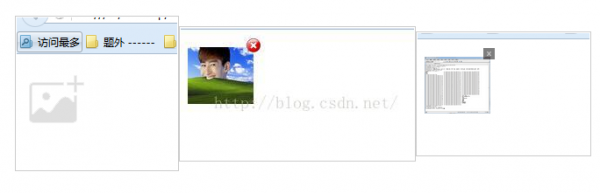
以上就是效果图。 右上角的图片可自己换图片,图片素材我就不放上来了,我就上个代码,挺简单的css和js,初学者应该也看得明白
</pre><pre name=”code” class=”html”><!DOCTYPE html PUBLIC “-//W3C//DTD XHTML 1.0 Transitional//EN” “http://www.w3.org/TR/xhtml1/DTD/xhtml1-transitional.dtd”>
<html xmlns=”http://www.w3.org/1999/xhtml”>
<head>
<meta http-equiv=”Content-Type” content=”text/html; charset=utf-8″ />
<title>无标题文档</title>
<style type=”text/css”>
.divX
{
z-index:200;
-moz-border-radius:20px;
-webkit-border-radius:20px;
line-height:10px;
text-align:center;
font-weight:bold;
cursor:pointer;
font-size:10px;
display: none;
}
</style>
</head>
<body>
<form id=”form” style=”margin-top:20px;”>
<div id=”img_div_1″>
<input type=”file” id=”file_input” οnchange=”addFile(this);” style=”display:none” />
<div style=”position: relative;”>
<img id=”file_img” src=”add_img.png” width=”75″ οnclick=”file_input.click();” height=”65″ />
</div>
<div class=”divX” id=”img_zindex_div_1″ οnclick=”del()”>
<img src=”no.png” width=”16″ height=”16″ />
</div>
</div>
</form>
</body>
<script src=”jquery-1.7.2.js” type=”text/javascript”></script>
<script type=”text/javascript”>
function addFile(ths) {
var objUrl = getObjectURL(ths.files[0]);
var left = $(#file_img).position().left;
var top = $(#file_img).position().top;
$(#img_zindex_div_1).css({position: “absolute”, left: left + 75, top: top + 10, display: “block” });
$(#file_img).attr(“src”, objUrl);
}
function del() {
alert(“删除”);
}
function getObjectURL(file) {
var url = null ;
if (window.createObjectURL!=undefined) { // basic
url = window.createObjectURL(file) ;
} else if (window.URL!=undefined) { // mozilla(firefox)
url = window.URL.createObjectURL(file) ;
} else if (window.webkitURL!=undefined) { // webkit or chrome
url = window.webkitURL.createObjectURL(file) ;
}
return url ;
}
</script>
</html>
搞定。收工了。复制代码,替换下图片素材就直接能用了
下班。走人
补充。由于拿left都是0
换种方式获取
var objUrl = getObjectURL(ths.files[0]);
var left = $(#file_img).offset().left;
var top = $(#file_img).offset().top;
// left为默认图的最左侧距离, 添加后的图片可根据 默认图的宽度 – 删除层图片的宽度(即:当前我默认图的宽度为75,删除层的图片宽度为16, left = 75 – 16, 位置就能到图片的最右侧了! top也是同样道理)
$(#img_zindex_div_1).css({position: “absolute”, left: left + 59, top: top – 5, display: “block” });
总结
到此这篇关于html+css 实现图片右上角加删除叉、图片删除按钮的文章就介绍到这了,更多相关html图片右上角加上删除内容请搜索脚本之家以前的文章或继续浏览下面的相关文章,希望大家以后多多支持脚本之家!
来源:脚本之家