
swiper组件是滑块视图容器,主要用来做图片轮播。这篇文章主要给大家介绍了关于微信小程序轮播图swiper代码的相关资料,需要的朋友可以参考下
微信小程序自定义swiper
滑块视图容器。其中只可放置swiper-item组件,否则会导致未定义的行为。
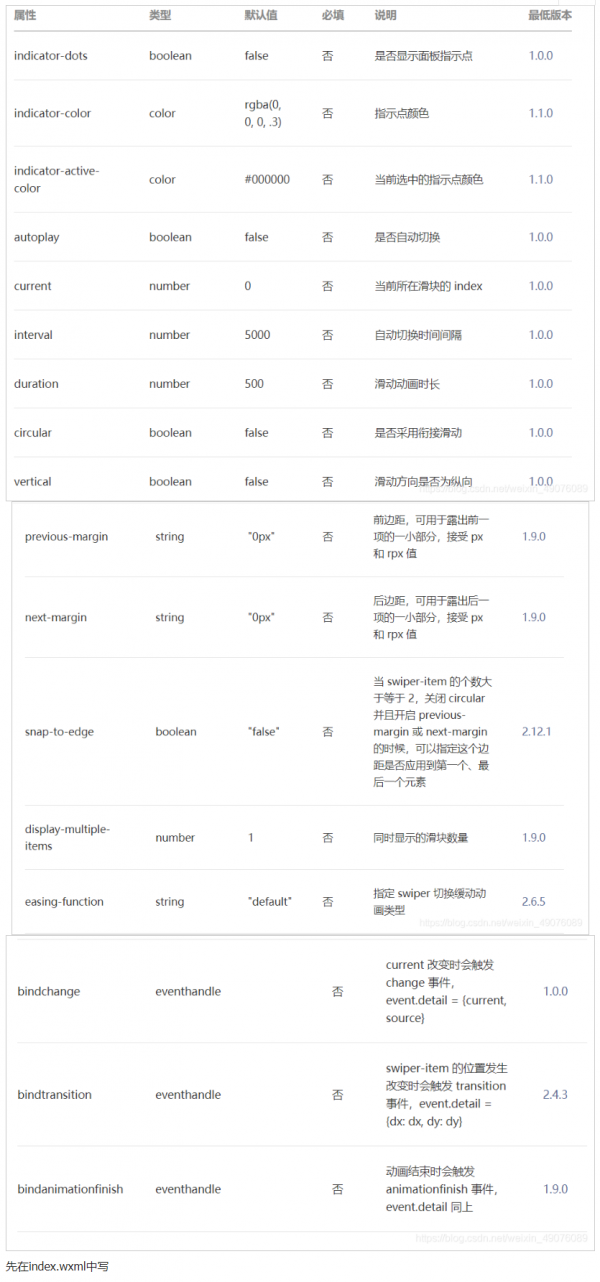
style=“background:{{item}}” 报错不要管,不影响页面布局
<view class=”container”>
<swiper class=”swiper1″
indicator-dots=”{{indicatorDots}}” 是否显示面板指示点
autoplay=”{{autoplay}}” 是否自动切换
interval=”{{interval}}” 自动切换时间间隔
duration=”{{duration}}” 滑动动画时长
circular=”{{circular}}” 是否采用衔接滑动
indicator-active-color=”#ff0099″ 选中指示点颜色
>
<block wx:for=”{{background}}” wx:key=”index”> 循环遍历数据
<swiper-item>
<view class=”swiper-item” style=”background:{{item}}”></view>
</swiper-item>
</block>
</swiper>
</view>
再在index.js中写
Page({
data: {
background: [“red”, “pink”,”yellowgreen”],
indicatorDots: true,
vertical: false,
autoplay: true,
interval: 2000,
duration: 500,
circular:true
}
})
最后在index.wxss中写
.swiper1{
width: 100%;
height: 200px;
}
.swiper-item{
width: 100%;
height: 100%;
}
记住:
图片跟背景颜色思路一样
到此这篇关于微信小程序轮播图swiper代码的文章就介绍到这了,更多相关微信小程序轮播图swiper代码内容请搜索脚本之家以前的文章或继续浏览下面的相关文章希望大家以后多多支持脚本之家!
来源:脚本之家