
这篇文章主要为大家详细介绍了Ajax实现文件上传功能,文中示例代码介绍的非常详细,具有一定的参考价值,感兴趣的小伙伴们可以参考一下
本文实例为大家分享了Ajax实现文件上传的具体代码,供大家参考,具体内容如下
前端表单 和 JQuery jsp/html代码
使用JQury
<script src=”static/js/jquery-3.4.1.js”></script>
前端表单
<form id=”form-avatar” enctype=”multipart/form-data”>
<p>请选择要上传的文件:</p>
<p><input type=”file” name=”file” /></p>
<p><input id=”btn-avatar” type=”button” value=”上传” /></p>
</form>
ajax请求服务器
<script>
function uploadfile(){
$.ajax({
url : “/url/upload”,
data: new FormData($(“#form-avatar”)[0]),
type : “POST”,
// 告诉jQuery不要去处理发送的数据,用于对data参数进行序列化处理 这里必须false
processData : false,
// 告诉jQuery不要去设置Content-Type请求头
contentType : false,
success : function(json) {
alert(“执行成功”);
},
error : function(json) {
alert(“执行失败”);
}
});
}
$(“#btn-avatar”).on(“click”,uploadfile);
</script>
Conroller.java
@PostMapping(“/upload”)
public void fileUpload2(@RequestParam(“file”) CommonsMultipartFile file, HttpServletRequest request) throws IOException {
System.out.println(“走了”);
//上传路径保存设置
String path = request.getServletContext().getRealPath(“/upload”);
File realPath = new File(path);
if (!realPath.exists()) {
realPath.mkdir();
}
//上传文件地址
System.out.println(“上传文件保存地址:” + realPath);
//通过CommonsMultipartFile的方法直接写文件(注意这个时候)
file.transferTo(new File(realPath + “/” + file.getOriginalFilename()));
}
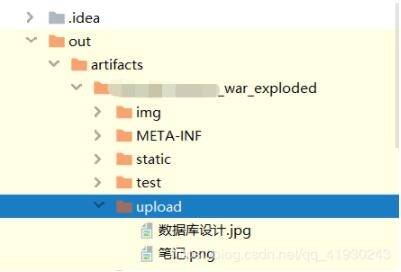
结果
以上就是本文的全部内容,希望对大家的学习有所帮助,也希望大家多多支持脚本之家。