
这篇文章主要介绍了linux grep不区分大小写查找字符串方法,需要的朋友可以参考下
grep用来过滤字符串信息,grep默认对字母大小写敏感,不过可以通过选项对grep屏蔽大小写敏感,该选项为 -i。
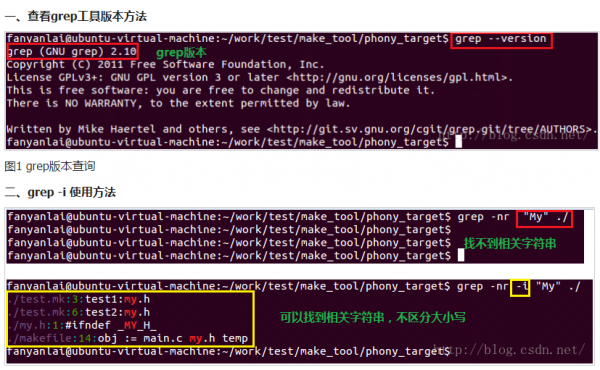
图2 grep不区分大小写
备注:
grep使用方法: grep [选项] PATTERN 文件
grep -i “error” #忽略大小写区分
grep -v “grep” #忽略grep命令本身,在文档中过滤掉包含有grep字符的行
grep进程时忽略自身
我们在通过进程ID查找进程时,通过如下命令:
ps -ef | grep 2112
来查找,但是这通常不能如愿:
[root@Linux-dtowen ~]# ps -ef | grep 2132
dtowen 2132 2118 0 22:51 ? 00:00:00 /usr/libexec/ibus-engine-pinyin –ibus
root 2247 2192 0 23:01 pts/1 00:00:00 grep 2132
2247明显就不是我们想要的,那么能不能把2247这个进程给去掉呢?答案是可以的。如下:
[root@Linux-dtowen ~]# ps -ef | grep 2132 | grep -v grep
dtowen 2132 2118 0 22:51 ? 00:00:00 /usr/libexec/ibus-engine-pinyin –ibus
以上就是linux grep不区分大小写查找字符串方法的详细内容,更多关于grep不区分大小写的资料请关注脚本之家其它相关文章!
来源:脚本之家