
这篇文章主要介绍了html中把多余文字转化为省略号的实现方法,本文通过实例代码给大家介绍的非常详细,对大家的学习或工作具有一定的参考借鉴价值,需要的朋友可以参考下
在html中如果要把多余的文字显示为省略号,那么有以下几种方法:
单行文本:
<!DOCTYPE html>
<html lang=”en”>
<head>
<meta charset=”UTF-8″>
<meta name=”viewport” content=”width=device-width, initial-scale=1.0″>
<title>Document</title>
<style type=”text/css”>
.box{
width: 200px;
background-color: aqua;
text-overflow: ellipsis;
overflow: hidden;
white-space: nowrap;
}
</style>
</head>
<body>
<div class=”box”>讲的是克辣椒的洒落看见斯科拉讲的是拉开讲的是了卡机快来撒建档立卡时间到了撒快乐到家撒了看见撒快乐到家撒健康了</div>
</body>
</html>

.box{
width: 200px;
overflow : hidden;
text-overflow: ellipsis;
display: -webkit-box;
-webkit-line-clamp: 2;
-webkit-box-orient: vertical;
border:solid 1px black;
}
缺点:仅适用于webkit内核或移动端页面。在火狐,ie等浏览器并不支持。
2.用伪元素模拟实现
设定固定宽高,多余部分隐藏,在结尾用包含省略号(…)的元素覆盖部分内容。
.box{
height: 200px;
width: 200px;
position:relative;
line-height:1.4em;
height:4.2em;
overflow:hidden;
}
.box::after {
content:”…”;
font-weight:bold;
position:absolute;
bottom:0;
right:0;
padding:0 -20px 1px 45px;
background-color:white;
}
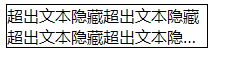
这里用一个包含了省略号,且背景色为白色的伪元素遮盖了部分内容。高度height 是行高 line-height 的三倍。需要显示几行文字就设置为几倍。
这种思路实现较为简单,兼容性也比较好。
注:如果要兼容ie6或7,则不能使用伪元素,可以使用一个
或者标签。如果要支持ie8,需要将::after写成:after。
到此这篇关于html中把多余文字转化为省略号的实现方法方法的文章就介绍到这了,更多相关html多余文字转化为省略号内容请搜索脚本之家以前的文章或继续浏览下面的相关文章,希望大家以后多多支持脚本之家!
来源:脚本之家
链接:https://www.jb51.net/web/737907.html