
今天小编给大家推荐一款酷炫闪烁的告警按钮,非常不错,具有一定的参考借鉴价值,需要的朋友参考下
效果如下:
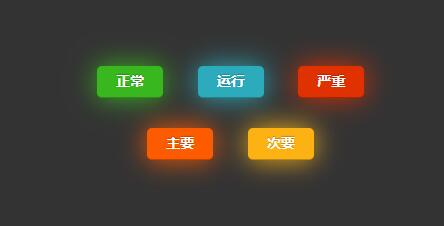
代码如下(点击可展开查看源码):
<!DOCTYPE html>
<html xmlns=”http://www.w3.org/1999/xhtml”>
<head>
<meta http-equiv=”Content-Type” content=”text/html; charset=utf-8″ />
<title>告警按钮</title>
<style type=”text/css”>
/* Place all stylesheet code here */
body { background: #333; text-shadow: 0 1px 1px rgba(0,0,0,.5); }
@-webkit-keyframes bigAssButtonPulse {
from { background-color: #1e6a0f; -webkit-box-shadow: 0 0 25px #333; }
50% { background-color: #39ba1f; -webkit-box-shadow: 0 0 75px #39ba1f; }
to { background-color: #1e6a0f; -webkit-box-shadow: 0 0 25px #333; }
}
@-webkit-keyframes greenPulse {
from { background-color: #1e6a0f; -webkit-box-shadow: 0 0 9px #333; }
50% { background-color: #39ba1f; -webkit-box-shadow: 0 0 27px #39ba1f; }
to { background-color: #1e6a0f; -webkit-box-shadow: 0 0 9px #333; }
}
@-webkit-keyframes bluePulse {
from { background-color: #036075; -webkit-box-shadow: 0 0 9px #333; }
50% { background-color: #2daebf; -webkit-box-shadow: 0 0 27px #2daebf; }
to { background-color: #036075; -webkit-box-shadow: 0 0 9px #333; }
}
@-webkit-keyframes redPulse {
from { background-color: #8c2305; -webkit-box-shadow: 0 0 9px #333; }
50% { background-color: #e33100; -webkit-box-shadow: 0 0 27px #e33100; }
to { background-color: #8c2305; -webkit-box-shadow: 0 0 9px #333; }
}
@-webkit-keyframes magentaPulse {
from { background-color: #470123; -webkit-box-shadow: 0 0 9px #333; }
50% { background-color: #a9014b; -webkit-box-shadow: 0 0 27px #a9014b; }
to { background-color: #470123; -webkit-box-shadow: 0 0 9px #333; }
}
@-webkit-keyframes orangePulse {
from { background-color: #b84c04; -webkit-box-shadow: 0 0 9px #333; }
50% { background-color: #ff5c00; -webkit-box-shadow: 0 0 27px #ff5c00; }
to { background-color: #b84c04; -webkit-box-shadow: 0 0 9px #333; }
}
@-webkit-keyframes orangellowPulse {
from { background-color: #bd5000; -webkit-box-shadow: 0 0 9px #333; }
50% { background-color: #ffb515; -webkit-box-shadow: 0 0 27px #ffb515; }
to { background-color: #bd5000; -webkit-box-shadow: 0 0 9px #333; }
}
a.button {
-webkit-animation-duration: 2s;
-webkit-animation-iteration-count: infinite;
}
.green.button { -webkit-animation-name: greenPulse;animation-name: greenPulse; -webkit-animation-duration: 2s;animation-duration: 2s; }
.blue.button { -webkit-animation-name: bluePulse; -webkit-animation-duration: 2s; }
.red.button { -webkit-animation-name: redPulse; -webkit-animation-duration: 2s; }
.magenta.button { -webkit-animation-name: magentaPulse; -webkit-animation-duration: 2s; }
.orange.button { -webkit-animation-name: orangePulse; -webkit-animation-duration: 2s; }
.orangellow.button { -webkit-animation-name: orangellowPulse; -webkit-animation-duration: 2s; }
.wall-of-buttons { width: 100%; height: 500px; text-align: center; }
.wall-of-buttons a.button { display: inline-block; margin: 0 30px 30px 0; }
/* playground.css */
.button { background: #222 url(overlay-button.png) repeat-x 0 0; display: inline-block; padding: 5px 15px 6px; color: #fff !important; font-size: 13px; font-weight: bold; line-height: 1; text-decoration: none; -moz-border-radius: 5px; -webkit-border-radius: 5px; -moz-box-shadow: 0 1px 3px rgba(0,0,0,0.25); -webkit-box-shadow: 0 1px 3px rgba(0,0,0,0.25); text-shadow: 0 -1px 1px rgba(0,0,0,0.25); border-bottom: 1px solid rgba(0,0,0,0.25); position: relative; cursor: pointer; overflow: visible; width: auto; }
button::-moz-focus-inner { border: 0; padding: 0; }
.button:hover { background-color: #111; color: #fff; }
.button:active { -webkit-transform: translateY(1px); -moz-transform: translateY(1px); }
/* Small Buttons */
.small.button { font-size: 11px; }
/* Large Buttons */
.large.button { font-size: 14px; padding: 8px 19px 9px; }
/* Colors for our beloved buttons */
.green.button { background-color: #91bd09; }
.green.button:hover { background-color: #749a02; }
.blue.button { background-color: #2daebf; }
.blue.button:hover { background-color: #007d9a; }
.red.button { background-color: #e33100; }
.red.button:hover { background-color: #872300; }
.magenta.button{ background-color: #a9014b; }
.magenta.button:hover { background-color: #630030; }
.orange.button {background-color: #ff5c00;}
.orange.button:hover { background-color: #d45500; }
.orangellow.button { background-color: #ffb515; }
.orangellow.button:hover { background-color: #fc9200; }
.white.button { background-color: #fff; border: 1px solid #ccc; color: #666 !important; font-weight: normal; text-shadow: 0 1px 1px rgba(255,255,255,1); }
.white.button:hover { background-color: #eee; }
</style>
</head>
<body id=”radioactiveButtonsPage” class=”chrome windows”>
<div class=”wall-of-buttons”>
<p> </p>
<p> </p>
<p> </p>
<p> </p>
<p> </p>
<p> </p>
<p><a class=”large green button”>正常</a>
<a class=”large blue button”>运行</a>
<a class=”large red button”>严重</a>
<br />
<a class=”large orange button”>主要</a>
<a class=”large orangellow button”>次要</a>
<br />
</p>
</div>
</body>
</html>
总结
以上所述是小编给大家推荐一款酷炫闪烁的告警按钮,希望对大家有所帮助,如果大家有任何疑问请给我留言,小编会及时回复大家的。在此也非常感谢大家对脚本之家网站的支持!
如果你觉得本文对你有帮助,欢迎转载,烦请注明出处,谢谢!